🚚 Free Worldwide Shipping on All Orders!Shop Now


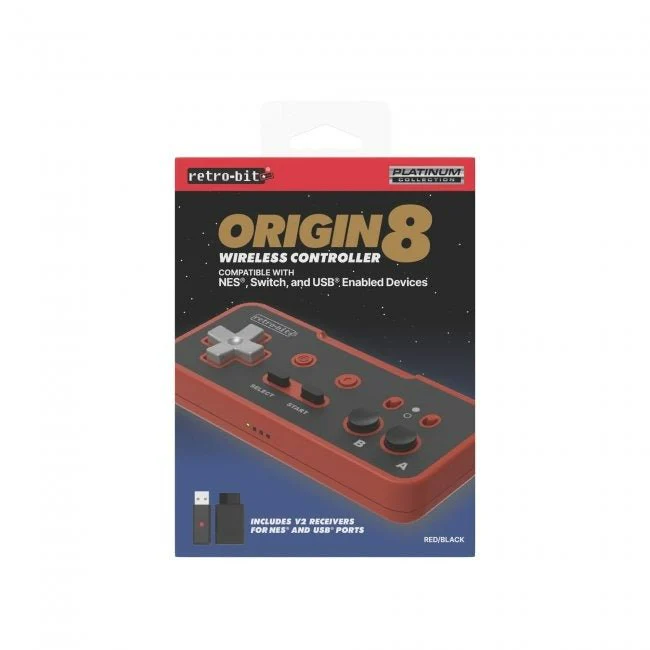

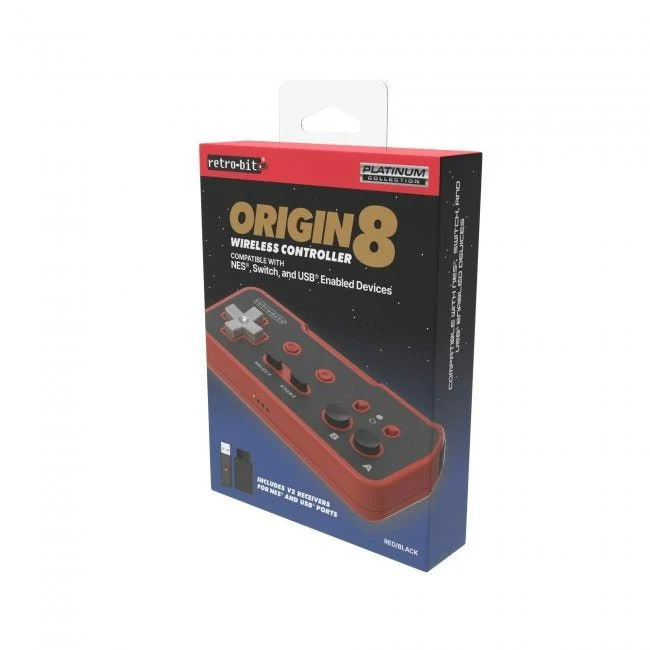


Origin8 Wireless controller for original Nintendo NES, Nintendo Switch & most USB enabled devices - Red & Black | Retro-Bit
Features:
Includes USB® and NES® wireless receivers
Optimized for NSO's classic libraries
Compatible with USB®-enabled devices via USB® Receiver
Compatible with original or 3rd party NES® consoles via NES® Receiver
Additional ZL and ZR shoulder buttons
Features Home and Screenshot buttons
Turbo switches built in for rapid fire for A & B
500 mAh battery with USB-C fast charging
3ft/1m USB-C to USB charge cable included
Utilizes the new V2 chip
Description:
Retro-Bit’s Platinum Collection of retro-inspired controllers has arrived in the 8-bit era with the Origin8.
It takes inspiration from the classic NES® era of gaming but is re-engineered to accommodate 4-shoulder buttons, Home, and Screenshot buttons.
The included Turbo switches will alleviate thumb stress as you rapid-fire your way through the classics.
You will also experience a stable 2.4 GHz wireless connection with the included receiver that supports compatibility with most USB®-enabled devices providing a retro experience on today’s consoles to relive our gaming origins.
Includes USB® and NES® wireless receivers
Optimized for NSO's classic libraries
Compatible with USB®-enabled devices via USB® Receiver
Compatible with original or 3rd party NES® consoles via NES® Receiver
Additional ZL and ZR shoulder buttons
Features Home and Screenshot buttons
Turbo switches built in for rapid fire for A & B
500 mAh battery with USB-C fast charging
3ft/1m USB-C to USB charge cable included
Utilizes the new V2 chip
Description:
Retro-Bit’s Platinum Collection of retro-inspired controllers has arrived in the 8-bit era with the Origin8.
It takes inspiration from the classic NES® era of gaming but is re-engineered to accommodate 4-shoulder buttons, Home, and Screenshot buttons.
The included Turbo switches will alleviate thumb stress as you rapid-fire your way through the classics.
You will also experience a stable 2.4 GHz wireless connection with the included receiver that supports compatibility with most USB®-enabled devices providing a retro experience on today’s consoles to relive our gaming origins.
Setup Instructions
1) Connect the receiver to the console and power the console on.
2) Hold the pair button on the receiver until the led blinks rapidly on the receiver, then release it.
3) On the controller, press start and the led should blink slowly, then press start again to force the connection to the receiver.
Reconnecting for each use.
To use the controller again after first setup, simply press the start button after booting up the console, the controller should reconnect.
Resetting the controller
You can reset the controller if you are having any issues getting the controller to reconnect.
1) Make sure your controller is fully charged before proceeding
2) On the back of the controller pad, there is a tiny hole. Use an unbent paper clip and push through it. It will press onto a tiny reset button inside.
2) Hold the pair button on the receiver until the led blinks rapidly on the receiver, then release it.
3) On the controller, press start and the led should blink slowly, then press start again to force the connection to the receiver.
Reconnecting for each use.
To use the controller again after first setup, simply press the start button after booting up the console, the controller should reconnect.
Resetting the controller
You can reset the controller if you are having any issues getting the controller to reconnect.
1) Make sure your controller is fully charged before proceeding
2) On the back of the controller pad, there is a tiny hole. Use an unbent paper clip and push through it. It will press onto a tiny reset button inside.
$10.20
Original: $33.99
-70%Origin8 Wireless controller for original Nintendo NES, Nintendo Switch & most USB enabled devices - Red & Black | Retro-Bit—
$33.99
$10.20Product Information
Product Information
Shipping & Returns
Shipping & Returns
Description
Features:
Includes USB® and NES® wireless receivers
Optimized for NSO's classic libraries
Compatible with USB®-enabled devices via USB® Receiver
Compatible with original or 3rd party NES® consoles via NES® Receiver
Additional ZL and ZR shoulder buttons
Features Home and Screenshot buttons
Turbo switches built in for rapid fire for A & B
500 mAh battery with USB-C fast charging
3ft/1m USB-C to USB charge cable included
Utilizes the new V2 chip
Description:
Retro-Bit’s Platinum Collection of retro-inspired controllers has arrived in the 8-bit era with the Origin8.
It takes inspiration from the classic NES® era of gaming but is re-engineered to accommodate 4-shoulder buttons, Home, and Screenshot buttons.
The included Turbo switches will alleviate thumb stress as you rapid-fire your way through the classics.
You will also experience a stable 2.4 GHz wireless connection with the included receiver that supports compatibility with most USB®-enabled devices providing a retro experience on today’s consoles to relive our gaming origins.
Includes USB® and NES® wireless receivers
Optimized for NSO's classic libraries
Compatible with USB®-enabled devices via USB® Receiver
Compatible with original or 3rd party NES® consoles via NES® Receiver
Additional ZL and ZR shoulder buttons
Features Home and Screenshot buttons
Turbo switches built in for rapid fire for A & B
500 mAh battery with USB-C fast charging
3ft/1m USB-C to USB charge cable included
Utilizes the new V2 chip
Description:
Retro-Bit’s Platinum Collection of retro-inspired controllers has arrived in the 8-bit era with the Origin8.
It takes inspiration from the classic NES® era of gaming but is re-engineered to accommodate 4-shoulder buttons, Home, and Screenshot buttons.
The included Turbo switches will alleviate thumb stress as you rapid-fire your way through the classics.
You will also experience a stable 2.4 GHz wireless connection with the included receiver that supports compatibility with most USB®-enabled devices providing a retro experience on today’s consoles to relive our gaming origins.
Setup Instructions
1) Connect the receiver to the console and power the console on.
2) Hold the pair button on the receiver until the led blinks rapidly on the receiver, then release it.
3) On the controller, press start and the led should blink slowly, then press start again to force the connection to the receiver.
Reconnecting for each use.
To use the controller again after first setup, simply press the start button after booting up the console, the controller should reconnect.
Resetting the controller
You can reset the controller if you are having any issues getting the controller to reconnect.
1) Make sure your controller is fully charged before proceeding
2) On the back of the controller pad, there is a tiny hole. Use an unbent paper clip and push through it. It will press onto a tiny reset button inside.
2) Hold the pair button on the receiver until the led blinks rapidly on the receiver, then release it.
3) On the controller, press start and the led should blink slowly, then press start again to force the connection to the receiver.
Reconnecting for each use.
To use the controller again after first setup, simply press the start button after booting up the console, the controller should reconnect.
Resetting the controller
You can reset the controller if you are having any issues getting the controller to reconnect.
1) Make sure your controller is fully charged before proceeding
2) On the back of the controller pad, there is a tiny hole. Use an unbent paper clip and push through it. It will press onto a tiny reset button inside.